

xplorer² lite
Read our comprehensive review of xplorer² lite, a dual-pane file manager for Windows designed to boost your daily document and folder productivity.
Managing a complex directory tree can quickly become overwhelming, but the xplorer² lite desktop file manager offers a highly efficient alternative to standard system tools. Developed by ZabKat, this lightweight Windows utility is designed specifically for power users, developers, and office professionals who need to navigate multiple directories simultaneously without losing their place.
Why Choose xplorer² lite desktop file manager?
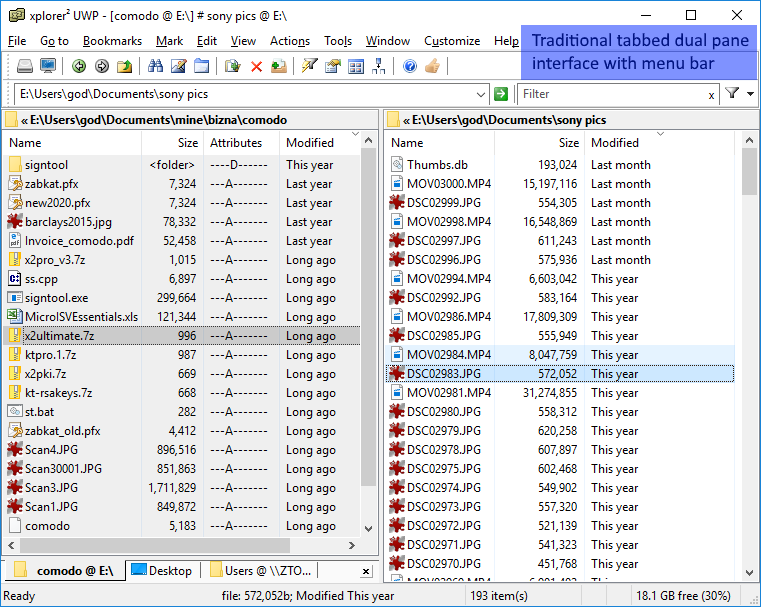
The primary appeal of this utility lies in its traditional, tabbed dual-pane interface. Instead of opening multiple overlapping windows to move files, you can view your source and destination folders side-by-side. This layout simplifies organization, allowing for seamless file comparisons, transfers, and synchronization tasks.
Key Features for Power Users
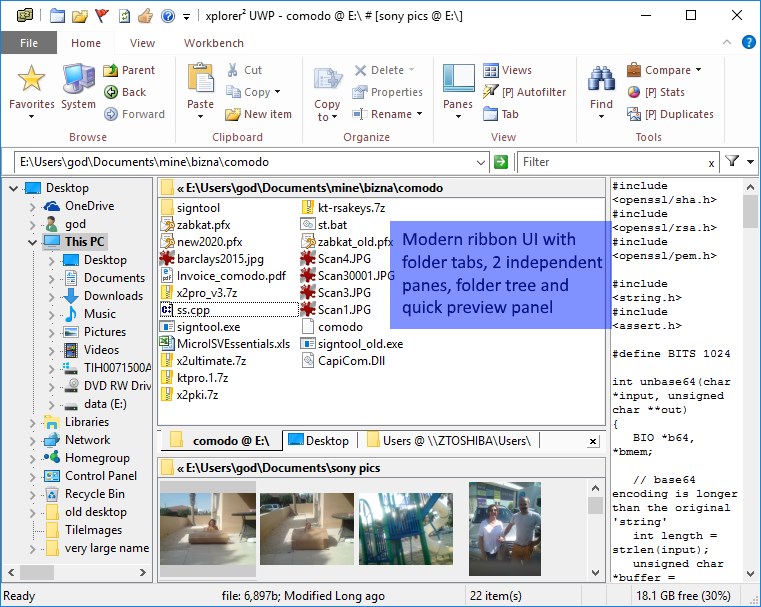
- Tabbed Dual-Pane Navigation: Browse several folders at once using intuitive tabs within a clean, split-screen interface.
- Deep Shell Integration: Enjoy compatibility with most Windows Explorer extensions, ensuring access to external devices, cameras, FTP servers, and zip archives.
- Advanced File Editing & Preview: Preview images, documents, and media instantly. The package also includes editor², a fast, lightweight notepad replacement for quick text edits.
- Spreadsheet-Style Metadata Editing: Modify file attributes, creation dates, and comments in-place, much like editing cells in a spreadsheet.
- Advanced File Management Tools: Split and join large files, securely shred sensitive data, and perform bulk renames using customizable templates.
An Efficient Workflow Upgrade
The xplorer² lite desktop file manager stands out because it packs advanced functionality into a highly responsive, fast-loading desktop footprint. It eliminates the friction of everyday file management by placing advanced sorting, filtering, and deep-search tools directly at your fingertips. Whether you are organizing vast photo libraries, managing source code, or cleaning up system archives, the interface adapts to your specific organizational habits.
Is It Right for You?
If you find yourself constantly dragging windows across your desktop just to copy files, or if you require deeper control over file metadata and bulk renaming, this tool is an exceptional fit. It bridges the gap between basic system navigation and advanced command-line control, wrapped in a customizable, user-friendly graphical interface.
To explore this powerful file management tool further and see how it can streamline your daily workflow, head over to the official Microsoft Store to view the application details.